Showing posts with label Distribution Point SCCM 2012. Show all posts

Wednesday, August 13, 2014

DP Configuration Status node showing In Progress!!!

1 Week back the team distributed the package to few DP, but after 1 week the status for DP was showing IN Progress....on checking we found that before the package was finished distributing the package was deleted from from sccm 2012. Hence it was still showing the status as In Progress.

But now we need to clear the status, so that console should look Green and Clean...But how????

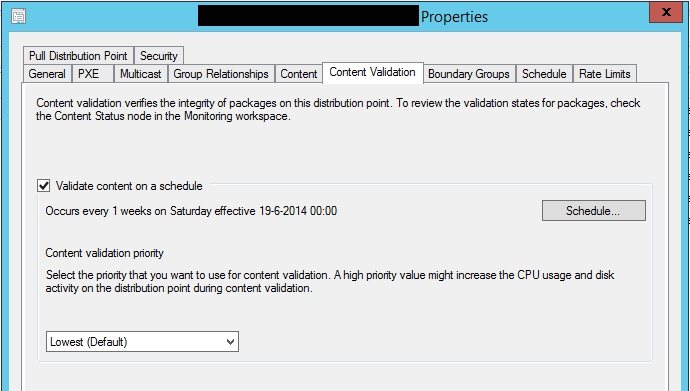
The solution to fix this was easy,Thanks to "Peter Daalmans" since the content was not available anymore. What must be done is enable and configure Content Validation on Distribution Point(s). Content Validation verifies the integrity of the packages on the distribution points.

Enable the Content Validation on the DP

Enable the Content Validation on the DP. After that the Content Validation had done his work the Distribution Point Configuration Status of all distribution points were successful.

Hope This Will Help!!!
Amarpal Singh Sandhu

Thursday, May 15, 2014

SCCM 2007 Distribution Point converts, but content fails

The issue is, in general, very straight forward.  The customer had several existing System Center Configuration Manager 2007 distribution points (DPs) which they wanted to upgrade to be System Center 2012 Configuration Manager DPs as part of their migration from the old product to the new.  The DP migration job ran and converted over the DP but none of the content was successful in conversion, which was really the point of the conversion in the first place.

Before I get into the gory details let me say that I have had numerous customers convert DPs and content, so why this failure occurred I don’t know.  It might have been something in the environment, it might have been a product defect, or it might have been a solar flare at the wrong time causing an electrical disruption.  In any case, the solution was so easy once we figured it out that we never bothered to spend time trying to find root cause.

The early symptom of the problem was a 2389 status message that indicated a failure to connect to the DP.  The logs seem to indicate some kind of WMI failure, which may not really be the problem.  After a bit of other troubleshooting steps we managed to follow these fairly easy steps to resolve it:

1.    Open up SQL Server Management Studio

2.    Run the following query against your ConfigMgr database, where <ServerName> is the FQDN name of the DP you are having problems with

select * from DistributionPoints  where ServerName = ‘<ServerName>’

3.    Make note of the corresponding DPID for your problem (in this example I will call it 123)

4.    Using the DPID returned form the query create an empty DPU file with the DPID as the file name
example:  123.dpu

5.    Put the file in the \Microsoft Configuration Manager\inboxes\distmgr.box

That’s it.  You should start seeing the content converted on the DP.  One query…, one DPU file…, problem solved!

Hope This Will Help !!!

Regards
Amarpal

Wednesday, February 13, 2013

How Distribution Point Work IN SCCM 2012

HOW Distribution Point Work in SCCM 2012 :

As we all know that DP playes most important role in configuration manger. There are lots of improvement in DP the way it use to work in  sccm2007.

The mager change that  microsoft maid in DP role is that they have merged all the distribution points (Standard, branch dp and server share) into a single DP role, the fact that you can select any machine (vista SP2 and above) to be a DP and Single Instance Storage. :)

The other major improvemnt t they’ve rolled is the merging pxe service point up into the DP so now instead of two roles, you can rely on the DP to pxe boot clients.

MS has introduce the new concept name "Single Instance Storage" for DP as I think this is a great feature. It allows you to only store a single instance of a unique file even when it is referenced by multiple packages. This is great! It means a largely reduced DP as it doesn’t have to replicate content into their separate directories. This has two direct benefits of using less disk space and less content replication traffic if your DP’s are over the wire in a branch office somewhere.

The change does mean that SCCM 2012 now uses a directory called the “content library” (SCCMContentLib) which contains three components, file, data and package library and this replaces the old method of using the SMSPKG shares as the default directory structure to host your packages and content.


The only real issue with this is because we now use single instance storage, grabbing a package from a DP manually can be a bit of a complicated as previously all we needed was the packageID and we could just match that up. Now the files are broken up in the three areas of the content library.


The datalib directory (Data Library) references the metadata of the file; its attributes and hash. The hash value will identify the file in question you are looking for.

The filelib directory (File Library) will host the actual file as well as data referencing which packages are linked with that relevant file.

The pkglib directory (Package Library) will tell you the details of that package in SCCM 2012 such as the version number/revision of that package etc.

When it comes to distribution time, SCCM will use all these pieces of data from the content library and “recreate” the package.

Howard Hoy writes a pretty in depth explanation of this:

http://blogs.technet.com/b/hhoy/archive/2012/05/31/an-adventure-in-the-sccmcontentlib-single-instance-store.aspx

Hope this will help you :)
Amarpal Singh Sandhu

(These postings are provided "AS IS" with no warranties, and confer no rights.)